
The Definitive Guide to eSIM Compatible Devices You Can Trust
Frequent travelers often face the hassle of physically swapping SIM cards when switching networks. eSIM compatible devices eliminate this by embedding a programmable chip directly into the phone, tablet, or smartwatch. Users can instantly activate a cellular plan from their device’s settings, keeping their physical SIM slot free for additional lines. This built-in digital process allows for seamless carrier switching without needing to handle a tiny card.
What It Means When a Phone Supports Embedded SIM Technology
When your phone supports embedded SIM technology, it means a tiny, non-removable chip is soldered directly onto the device’s motherboard—no physical card slot required. This allows you to activate a cellular plan by scanning a QR code or using an app from your carrier, instantly connecting your eSIM compatible device without waiting for a plastic SIM to arrive. The real shift is in flexibility: you can store multiple profiles, like one for work and one for personal use, and switch between them from your phone’s settings. Travelling abroad, you simply buy a local data plan digitally, avoiding the hunt for a tiny store and swapping trays on a rainy street. This eliminates the fragile, fiddly process of popping out SIMs—your connection becomes purely a software choice, not a physical one.
Key Differences Between eSIM and Physical SIM Cards
The primary distinction is that a physical SIM is a removable plastic chip you must insert and swap, whereas an eSIM is a reprogrammable chip soldered inside your device. This makes switching carriers or plans digital and instantaneous, without needing to wait for a physical card to ship. With a physical SIM, you are tied to one network profile per card slot; an eSIM supports multiple profiles on a single chip, allowing you to hold separate business and personal lines or a travel plan simultaneously.
- Switching carriers requires procuring and inserting a new physical card versus scanning a QR code or using an app for an eSIM.
- A physical SIM can be physically removed if your phone is lost; an eSIM remains locked to the device unless remotely erased.
- eSIM frees the SIM tray slot, enabling better water resistance and internal space for other hardware.
- Physical SIMs allow instant transfer between phones by moving the card; eSIMs require carrier activation on the new device.
Why Carriers Require Specific eSIM Profiles
Carriers require specific eSIM profiles because the profile contains unique authentication credentials—essentially a digital SIM card—that must match the carrier’s network infrastructure to secure connectivity. Without a carrier-specific profile, the eSIM profile matching process fails, preventing device registration and service activation. Each profile is encrypted with carrier-unique keys, ensuring only approved devices can access their network bands and services.
Q: Why Carriers Require Specific eSIM Profiles?
A: Carriers tailor each profile to their network’s specific technical parameters, such as authentication algorithms and provisioning rules, which standardized profiles cannot fulfill.
How to Check If Your Smartphone Has This Feature
To confirm if your phone supports eSIM, first navigate to **Settings > Connections > SIM Manager**; look for an option to «Add eSIM» or «Add mobile plan.» Alternatively, dial *#06#—if a unique EID number appears, your device is embedded SIM-ready. Check the original packaging or the manufacturer’s website for explicit «eSIM» mention. Verify eSIM compatibility directly in your phone’s settings before purchasing a plan. Q: How do I check for eSIM without a physical SIM? A: Go to Settings, search for «eSIM,» and if the menu offers to download a new line, your phone has the feature.
Flagship Phones That Work With Digital SIMs in 2025
In 2025, flagship phones that work with digital SIMs represent the pinnacle of eSIM compatible devices, offering seamless dual-network management without physical SIM trays. The Apple iPhone 17 Pro and Samsung Galaxy S26 Ultra support dual active eSIMs, enabling simultaneous work and personal lines. Google’s Pixel 11 Pro includes penta-band eSIM support for global roaming, while the OnePlus 14 and Xiaomi 15 Pro allow quick eSIM transfers via QR codes or carrier apps. All listed models require a carrier that activates eSIM through software, not hardware, ensuring compatibility with digital profiles for travel or local plans. These devices eliminate the need for physical cards, simplifying carrier switching directly from settings menus.
Apple iPhone Models Ready for Carrier Switching
For carrier switching, Apple’s iPhone lineup from the iPhone XS onward supports dual eSIM activation, allowing users to store multiple carrier profiles without physical SIM swaps. The iPhone 14 and later models sold in the U.S. are eSIM-only, simplifying switching via Settings for immediate connectivity. Older eSIM-ready iPhones, like the iPhone 11, still require a physical SIM slot for one line, limiting dual-eSIM flexibility. Which Apple iPhone models support simultaneous carrier switching between two eSIMs? All iPhone 13 and newer models can hold two active eSIMs at once, while iPhone XS through 12 manage one eSIM plus one physical SIM.
Samsung Galaxy Devices With Dual SIM Flexibility
Samsung’s flagship Galaxy S24, S24+, S24 Ultra, Z Fold6, and Z Flip6 all support dual SIM flexibility by combining one physical nano-SIM with one embedded eSIM. Users can manage two active lines simultaneously—for instance, a personal number and a work line—without needing to swap trays. The eSIM is programmed directly in Settings under Connections, allowing instant carrier profile downloads. This hybrid setup ensures compatibility with legacy physical SIMs while future-proofing connectivity, making these devices ideal for travelers or professionals requiring distinct numbers on one handset.
Google Pixel Phones Optimized for International Travel
For international travel, Google Pixel phones are optimized through their deep integration with eSIMs, allowing users to activate local data plans without physical SIM swaps. The travel-ready eSIM management is a core feature, enabling storage of multiple profiles for different countries. Switching between these profiles is handled directly in the device’s settings menu, avoiding the need for separate carrier apps. This setup provides a clear sequence for first-time use:
- Navigate to «Network & Internet» in the phone’s settings.
- Tap «Add eSIM» and scan a QR code from a local carrier or travel plan provider.
- Select the newly added profile as the default for mobile data upon arrival.
This streamlined process ensures connectivity across borders with minimal friction.
Mid-Range and Budget Options With Integrated SIM Technology
For users seeking affordable eSIM compatible devices, mid-range and budget options now integrate dual SIM technology that pairs a physical nano-SIM with an embedded eSIM. This allows you to activate a secondary plan—like a local data package while traveling—without swapping cards. Key models like the Google Pixel 7a and Samsung Galaxy A54 offer full eSIM support for under $500, enabling seamless carrier switching directly from your settings menu. Even budget phones like the Moto G Power 5G (2024) include eSIM, letting you keep your primary number active while testing a cheaper prepaid data plan. This integration makes global roaming or multi-network redundancy practical, not just a premium feature.
OnePlus and Motorola Models Supporting Remote Provisioning
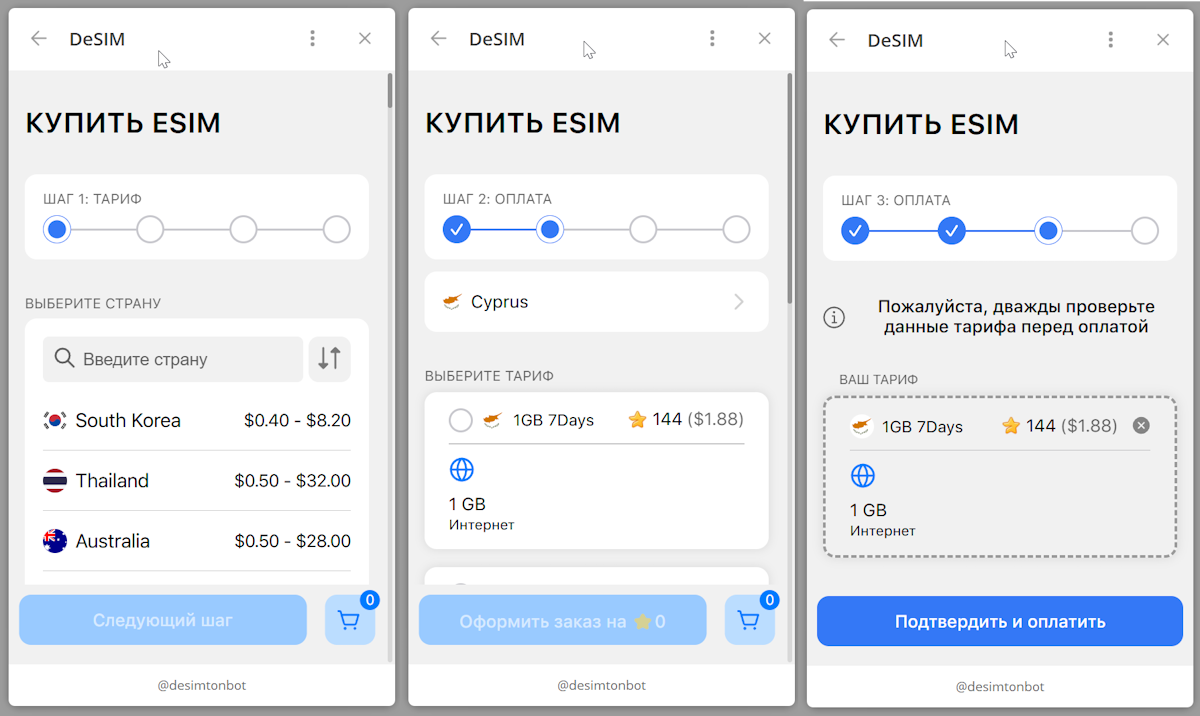
OnePlus and Motorola integrate eSIM remote provisioning into their mid-range and budget lines, enabling users to activate cellular plans without a physical card. For OnePlus, models like the Nord N30 and Nord CE 3 support this via a software-based eSIM manager in Settings. Motorola’s G series, including the Moto G Stylus 5G and Moto G 5G, offer seamless eSIM profile downloads through carrier QR codes or in-app setup. A typical activation sequence is:
- Access the device’s Network & Internet menu.
- Select “Add eSIM” and scan the carrier-provided QR code.
- Confirm profile download and assign the line for data or voice.
Both brands allow switching between two eSIM profiles or pairing one eSIM with a physical SIM for dual-SIM use. None of these steps require third-party tools.
Xiaomi and Realme Handsets With eSIM Capabilities
Xiaomi and Realme handsets with eSIM capabilities offer dual-SIM flexibility in mid-range devices, typically pairing a physical nano-SIM with an embedded eSIM for Xiaomi and Realme users. Models like the Xiaomi 13 Lite and Realme GT 2 Pro support eSIM activation through carrier QR codes, allowing users to switch profiles without swapping cards. The Xiaomi 14T series provides native eSIM management in its settings menu, while Realme’s GT Neo 5 enables eSIM for travel or secondary numbers. Both brands require carrier-specific eSIM provisioning, and not all regional variants include the feature—verifying compatibility before purchase is essential.
| Feature | Xiaomi eSIM Handsets | Realme eSIM Handsets |
|---|---|---|
| Typical eSIM Slot | eSIM + 1 physical SIM (some models) | eSIM + 1 physical SIM |
| Management Interface | Settings > SIM cards & mobile networks | Settings > Dual SIM & cellular |
| Notable Models | Xiaomi 13 Lite, Xiaomi 14T | Realme GT 2 Pro, Realme GT Neo 5 |
| Regional Limitation | Present in global/EU variants; absent in most China models | Available in global variants; limited Chinese models |
Oppo and Vivo Devices That Combine Physical and Digital Slots
Oppo and Vivo devices with hybrid SIM trays offer a practical bridge between physical and digital slots. Models like the Oppo Reno series and Vivo V series let users install one physical nano-SIM alongside an eSIM, while retaining a second physical slot for a microSD card if needed. This dual-SIM flexibility allows you to activate a primary eSIM for data and a physical SIM for calls, or vice versa, without sacrificing expandable storage. Unlike single-eSIM phones, these devices let you swap carriers instantly via a digital profile while keeping a local physical SIM active.
Oppo and Vivo hybrid tray devices combine one physical SIM slot and one eSIM, enabling simultaneous use of two lines plus optional microSD storage, directly addressing the need for adaptable SIM management without forcing users to abandon physical cards.
Non-Smartphone Hardware That Uses eSIM Connections
When you step away from the smartphone, eSIM technology slips into rugged tools built for specific jobs. A smartwatch like the Apple Watch Ultra uses an eSIM to stream music and take calls while you run without a tethered phone. On the open road, a cellular-enabled laptop like the Lenovo ThinkPad X1 Carbon swaps its internal eSIM between regional carriers, keeping you connected in airports or co-working spaces without hunting for a physical nano-SIM. For adventurers, a portable hotspot such as the GlocalMe G4 relies on an eSIM to tap into local data plans the moment you land, bypassing kiosks. Even industrial IoT sensors in shipping containers use embedded eSIMs to report location without needing a technician to swap a card, so a fleet manager sees real-time tracking from the dashboard.
Smartwatches With Cellular Standalone Features

Smartwatches with cellular standalone features leverage embedded eSIM technology to operate entirely independent of a paired smartphone. This allows users to make calls, stream music, and receive notifications directly from the wrist, even when the phone is at home. The true standalone connectivity is critical for athletes who run without a phone or for quick errands. A single eSIM profile manages both phone line sharing and a dedicated watch number, ensuring seamless untethered operation without needing a separate data plan.
Smartwatches with cellular standalone features unlock total freedom from the smartphone via eSIM integration.
Laptops and Tablets Built for Always-On Connectivity
Modern laptops and tablets with eSIM eliminate the need for hunting down Wi-Fi or fumbling with physical SIM cards. These built-for-connectivity devices let you instantly activate a cellular data plan directly from the device settings, ensuring you are always online for cloud syncing or remote work. The setup process is straightforward for the user: first, purchase a data plan from the device’s interface; second, download the eSIM profile with a few taps; and third, toggle mobile data on. This integration transforms a standard portable computer into a true anywhere, anytime workstation, ideal for professionals constantly on the move.
Routers and IoT Gadgets Leveraging Remote SIM Management
Routers and IoT gadgets use Remote SIM Management to eliminate physical SIM swaps, provisioning connectivity instantly via a central platform. For a remote sensor or travel router, you simply activate a remote SIM management profile over the air. This involves a clear sequence:
- Select a data plan from the management dashboard.
- Push the eSIM profile to the device’s secure chip.
- The device connects to the network automatically.
This process lets fleet operators or field engineers switch carriers on multiple devices without touching hardware. The gadget remains operational across regions, using the management platform to switch between local networks based on signal strength or cost, ensuring uninterrupted data flow for surveillance cameras or industrial trackers.
Regional Variations in Supported Handsets
Regional variations in supported handsets for eSIM compatible devices primarily hinge on carrier certification and local hardware provisioning. A flagship phone sold in the US, for instance, may lack the specific eSIM profile for a Japanese carrier, even if the chipset supports the standard. Similarly, a Chinese-market device might only allow a single eSIM slot, while a European variant of the same model supports dual-active eSIMs. Before purchasing, check the manufacturer’s regional SKU list: a global model often works across more networks than a carrier-locked local unit. Your phone’s IMEI must match the carrier’s database for that region to download an eSIM.
North American Models vs. Global Unlocked Versions
When picking an eSIM-compatible device, you’ll often choose between a North American model vs. global unlocked version. NA models, sold by carriers like T-Mobile or Verizon, typically support mmWave 5G for ultra-fast speeds in the US, but may lock eSIM profiles to one carrier temporarily. Global unlocked versions, like those from Samsung or Xiaomi, skip mmWave but offer dual active eSIMs and easier carrier switching worldwide. Always check the model number: an NA variant might not activate eSIM abroad as smoothly, while a global version can juggle multiple eSIMs for travel without hassle.
In short: NA models prioritize US-specific 5G bands and carrier ties; global unlocked versions favor flexible, multi-eSIM use across countries.
European and Asian Market Exclusives
European and Asian markets host exclusive eSIM-compatible devices not available globally. For example, the Xiaomi 13 Lite draws European demand with its integrated eSIM, while Japan’s Sharp Aquos R8 Pro offers regional eSIM-only variants. Apple’s China-specific iPhone models lack eSIM due to local hardware mandates, but carriers there provide dual physical SIM slots instead. In South Korea, Samsung Galaxy Z Fold6 units packed for the Asian market support region-locked eSIM provisioning, restricting carrier switching until unlocked. Q: Can I use a European eSIM-exclusive phone in Asia? A: Some models from Huawei or Oppo have conflicting bands and eSIM profiles, making cross-region activation unreliable without a global firmware update.
Why Some Carriers Restrict Certain Handsets
Carriers restrict certain eSIM-compatible handsets mainly because they haven’t fully tested them with their specific network bands or software profiles. Carrier-specific eSIM provisioning can be finicky; a phone that works flawlessly on one network might fail to activate or drop calls on another due to incompatible firmware. So, to avoid user headaches and support costs, carriers simply whitelist only the devices they have rigorously validated.
In short, carriers restrict handsets to guarantee a smooth, hassle-free eSIM experience on their network.
How to Activate a Digital SIM on Your Current Device
To activate a digital SIM on your current device, first confirm your handset is an eSIM compatible device by checking its settings menu for an option like “Add eSIM” or “Add Cellular Plan.” Obtain a QR code or activation details from your carrier. Go to Settings > Cellular (or Mobile Data) > Add Cellular Plan. Scan the QR code, or enter the details manually if prompted. Follow the on-screen instructions to label the line and set your primary data usage. Once the plan is installed, your device will connect to the network. This digital SIM activation process typically takes under five minutes, and no physical card is required.
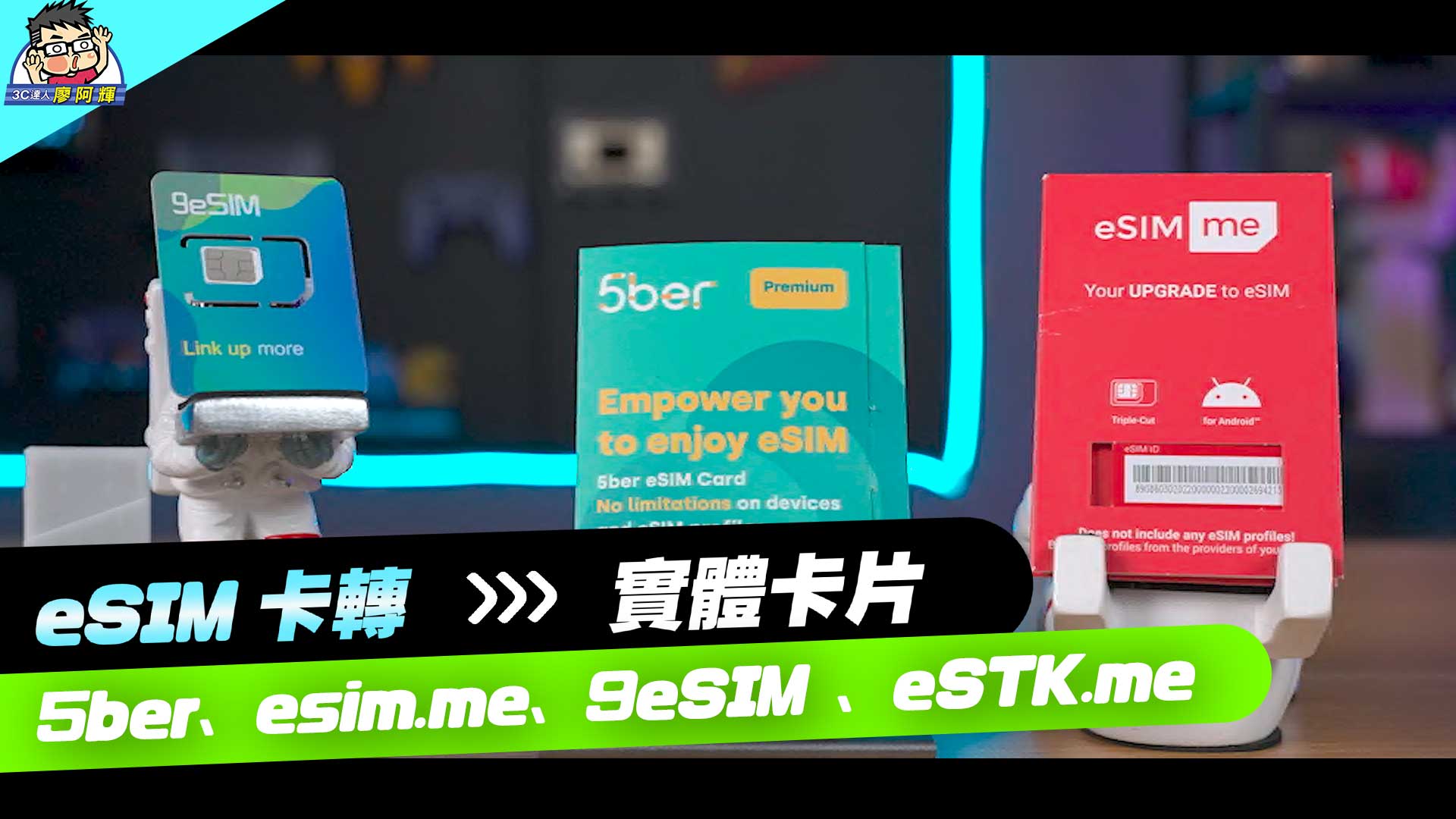
Scanning a QR Code From Your Mobile Provider
To activate a digital SIM, you first obtain a unique QR code from your mobile provider, typically via email or their online portal. On an eSIM compatible device, navigate to the cellular or mobile data settings and select the option to add a new plan. Scanning a QR Code From Your Mobile Provider instantly downloads the profile, but ensure your device has a stable internet connection via Wi-Fi to avoid failure. The code is a one-time-use key, so handle it carefully during the activation window. If scanning fails, manually entering the SM-DP+ address printed below the QR code often resolves the issue.
- Keep the QR code in a secure digital or printed copy until activation completes, as it may expire after a set period.
- Position the rear camera to frame the code squarely within the on-screen guide for a successful scan.
- Verify the provider’s QR code originates from their official channel to avoid malicious profiles.
Using a Carrier App to Install an eSIM Profile
To activate a digital SIM, using your carrier’s official app is often the simplest route. First, download the app from your device’s store, then log into your account. Look for a “Get eSIM” or “Add a Line” option. The app will guide you to scan a QR code or tap an installation button, automatically writing the eSIM profile download to your phone. No physical card is needed. After a quick reboot, your new line appears in Cellular settings. The whole process takes under five minutes and works seamlessly on compatible devices.
- Open the carrier app and sign in
- Select “Add eSIM” from the menu
- Follow on-screen prompts to install the profile
- Restart your device to activate service
Manual Setup Options for Advanced Users
For advanced users, navigating beyond QR code activation, manual eSIM profile entry offers granular control. This method requires inputting an activation code and SM-DP+ address from your carrier directly into your device’s cellular settings. You will manually specify a confirmation code and, in some cases, a detailed profile name for management. This bypasses automatic detection, allowing you exactly configure the connection parameters if your carrier provides this data. Consequently, you maintain full oversight of the provisioning process, ideal for troubleshooting or deploying multiple profiles across complex network environments without the GUI wizardry.
Potential Drawbacks When Relying on Embedded SIMs
Relying on embedded SIMs (eSIMs) in compatible devices introduces specific user-side trade-offs. The most immediate drawback is the loss of instant physical portability; you cannot simply swap a removable card between handsets for a quick battery boost or emergency loaner. Troubleshooting connectivity issues also becomes more opaque, as a network profile cannot be removed and reinserted to force a fresh registration. What is the core practical risk? If your eSIM profile becomes corrupted during an over-the-air update, you may lose cellular service entirely until you can access Wi-Fi to re-download a new profile from your carrier. Finally, managing multiple lines on a single eSIM device demands careful attention in the phone’s settings menu, as accidental deactivation of your primary data line can leave you stranded without guidance.
Limited Availability on Older or Second-Hand Phones
While eSIM adoption grows, limited availability on older or second-hand phones creates a practical barrier. Pre-2018 models, such as the iPhone XS or earlier, physically lack eSIM hardware, making them incompatible regardless of software updates. Second-hand budget Android devices often remove eSIM support to cut costs, leaving buyers unaware. Additionally, carrier-locked older phones may block eSIM activation even if the hardware is present. This restricts choice for users seeking affordable or repairable devices, forcing reliance on physical SIMs in a market shifting toward digital-only connectivity.
- Many second-hand phones from 2017 or earlier have no eSIM chip, requiring a physical SIM tray.
- Budget refurbished models, like certain Galaxy A series, often omit eSIM to reduce manufacturing costs.
- Carrier-locked older phones may disable eSIM profiles even if the hardware supports them.
- Replacement parts for older phones rarely include eSIM circuitry, complicating repairs.
Compatibility Issues With Certain Network Bands
An eSIM-compatible device’s inability to access certain network bands creates limited regional roaming coverage. Unlike physical SIMs, which can be swapped for a local carrier’s band-specific card, an embedded profile is locked to the device’s modem firmware. If that firmware lacks support for, say, Band 12 on a T-Mobile network or Band 20 on a European LTE system, the device will experience no service or severely degraded speeds in those areas. This is particularly problematic for travelers whose phones omit niche frequencies used by rural towers or older infrastructure. A user must verify their device’s band catalog against their target carrier’s spectrum before purchasing an eSIM plan.
Difficulty Switching Between Multiple Profiles Quickly
Managing multiple lines on an eSIM device can feel sluggish, as the user experience of profile switching often involves navigating deep menus and enduring a device reboot or network re-registration. This delay interrupts workflows, making it impractical to hop between work and personal numbers mid-conversation. Unlike a physical dual-SIM tray, swapping profiles isn’t instantaneous, which frustrates users who need rapid access to different carriers for travel or task segmentation.
- Each switch typically requires disabling one profile, then enabling another, with a 30–60 second activation delay.
- Some devices lock out all connectivity during the switch, preventing emergency calls until the process completes.
- Active data sessions, like streaming or downloads, are often dropped, requiring manual restart after the profile change.
- Storing more than five profiles may slow down the phone’s network scan, adding further lag when selecting a new line.
Future Trends in eSIM-Ready Technology
The quiet hum of a morning commute is changing. A traveler pulls out an eSIM-compatible device, a rugged tablet with no physical tray, and taps a new regional data profile before boarding. Future trends point to devices that intelligently switch profiles based on signal stability, not just location. Imagine a smartwatch, after losing its primary carrier’s signal underground, automatically testing and swapping to a backup eSIM from a satellite partner without any user prompt. *Q: Will future eSIM devices UK eSIM manage roaming autonomously? A: Yes, embedded context-aware logic will let them choose the strongest available carrier profile mid-connection.* The seamless handover, happening while the user walks from subway to street, redefines connectivity—no searching for settings, just a continuous link.
Growing Adoption Among Entry-Level Smartphones
Entry-level smartphones increasingly ship with integrated eSIM, removing the need for physical SIM trays. This shift lets budget-conscious users instantly activate a local data plan upon arrival in a new country, or switch carriers for a better rate without hunting for a tiny SIM ejector tool. For travelers on a tight budget, this means seamless dual-SIM flexibility is no longer a premium feature. Entry-level models now offer the same convenience as flagship phones, letting you keep your home number active while using a cheaper local eSIM for data, all managed from a single interface.
Integration Into Wearables Beyond Watches
eSIM technology is rapidly expanding from smartwatches into a broader ecosystem of wearables, such as smart glasses and medical patches. These devices leverage eSIMs for constant connectivity without occupying a physical SIM slot, enabling features like real-time GPS navigation in lightweight glasses. Integration requires careful power management to maintain a reliable cellular connection without draining a tiny battery. For adoption, manufacturers should prioritize seamless eSIM provisioning that mirrors the user’s primary smartphone number.
- Pair the wearable with a carrier’s eSIM activation app.
- Download a secondary or shared data-only profile from your existing plan.
- Enable independent cellular functionality for calls and texts.
This approach ensures fitness trackers and AR headsets remain genuinely standalone.
Regulatory Changes Impacting Global eSIM Availability
As tech moves fast, rules around eSIMs are shifting, which directly affects which global eSIM availability you can actually use. Some regions now mandate that devices sold locally must support multiple eSIM profiles, making it easier to switch carriers without a physical card. Conversely, other areas restrict how many profiles a phone can store simultaneously, limiting your ability to hop networks when traveling. This patchwork means your next eSIM-ready phone might work perfectly in one country but lock you out of features in another, so always check local compliance before buying.
- New laws in some countries require devices to accept multiple eSIM profiles at once.
- Other regions cap the number of stored profiles, reducing flexibility while abroad.
- Upcoming rules may force manufacturers to include eSIM hardware even in budget phones.